

The Excelized Converter: Read, Clean, Export — Without Uploading a Thing

Updated: 5 days ago
Most file converters ask you to hand your data to a stranger's server. For anyone working with client figures, personnel lists, or anything covered by a confidentiality clause, that is a non-starter. So I built one that doesn't.
The Excelized Converter is a single HTML file that runs entirely in your browser. You open it, drop in a file, and it reads, cleans, and exports — with no upload, no account, and no backend. The file you drop in never leaves your device.
You can also use the converter on the Excelized Tools page.
What it does
Reads what you actually have. Excel in all its generations (.xlsx, .xlsm, .xlsb, .xls), OpenDocument, CSV and TSV with automatic delimiter detection, Word (.docx and legacy .doc), RTF, PDF, JSON, plain text, and images. If a PDF turns out to be a scan with no text layer, the tool notices and offers OCR instead of silently returning an empty document.
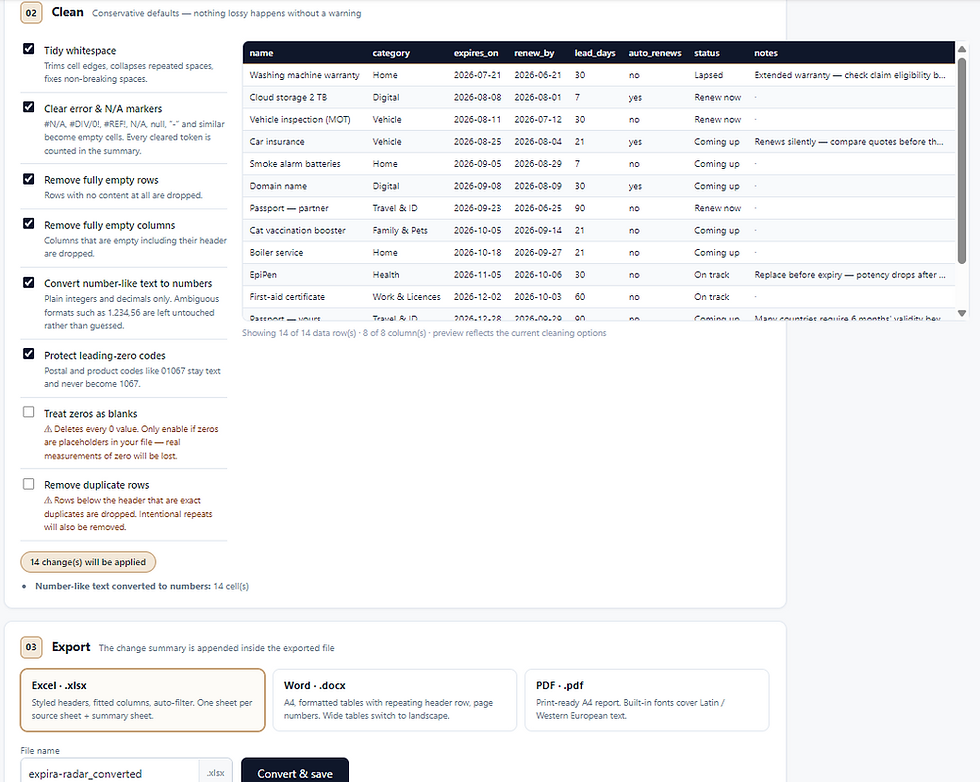
Cleans the mess. Real files arrive with trailing spaces, #DIV/0! scattered through them, empty rows and columns, and numbers stored as text. The converter tidies all of that and shows you a live preview of the result before you commit to anything.
Exports properly formatted. Excel output gets styled headers, fitted columns, auto-filter, and real date cells — not text that looks like dates. Word output is A4 with repeating table headers and page numbers, switching to landscape automatically when a table is too wide for portrait. PDF output is print-ready.
Documents what it changed. Every conversion appends a change summary inside the exported file: which options were active, how many cells were trimmed, exactly which error tokens were cleared and how often. If you hand the output to a colleague or an auditor, the provenance travels with it.
The part most converters get wrong
Cleaning is destructive by nature, so the defaults are deliberately conservative.
Zeros are kept. A zero is usually a real measurement, not a placeholder, and a tool that quietly deletes them will eventually cost someone a reconciliation. Postal codes and product codes keep their leading zeros — 01067 stays 01067 and never becomes 1067. Ambiguous number formats like 1.234,56 are left untouched rather than guessed at, because a wrong guess is worse than no guess.
The two genuinely lossy options — treating zeros as blanks and removing duplicate rows — are switched off by default and carry an explicit warning about what they will delete.
Known limitations
Being honest about what a tool can't do is more useful than a feature list:
Legacy .doc (pre-2007 binary Word) has no reliable browser-side parser. The tool extracts text best-effort and says so plainly. Resave as .docx for a faithful conversion. Legacy .xls is fully supported.
The save dialog — choosing your own folder — works in Chromium browsers (Chrome, Edge). Firefox and Safari don't support that API and save to Downloads; the tool detects which browser you're on and tells you what will happen.
OCR is best-effort. Accuracy depends on image quality, and results are flagged with their confidence score rather than presented as certain.
PDF export uses built-in fonts covering Latin and Western European characters. Anything outside that range is substituted and counted in the summary — choose Excel or Word for other scripts.
First use needs internet. The conversion engines load from a public CDN.
Why build it this way
Client-side processing isn't a technical flourish; it removes an entire category of question. There is no data retention policy to read, because there is no server to retain anything. That makes the tool usable in situations where an upload-based converter simply isn't an option.
It handles the boring, repetitive part of data work — the part that happens before the analysis starts and that nobody bills for.
Save it in your browser for a quick conversion when needed.
More free data tools
Explore the converter and other browser-based tools in one place.


Comments